
Quick Summary
Understanding how to reset automatic gate opener systems safely is crucial when an electric gate stops responding, halts mid-travel, or triggers entrapment-protection faults. Proper troubleshooting requires cycling system power according to manufacturer specifications, checking for physical binding, realigning safety sensors, and recalibrating travel limits in compliance with UL 325 standards. By following this guide, you can safely restore standard gate movement or contact the specialists at Ironworks Gate Co. for an on-site assessment if persistent electrical or mechanical faults remain.
“`html
How to Reset an Automatic Gate Opener Safely in 6 Steps
When an automatic gate stops halfway, refuses to close, or ignores remote commands, troubleshooting may be necessary. However, resetting a gate opener must always be done carefully. Always consult the operator’s owner manual before resetting, disconnecting power, using a manual release, changing limits, or pairing remotes.[2]
Safety must always come first. Gate motors exert significant force. Before inspecting or servicing any controls, clear the gate path, make sure nobody is standing near the leaf or track, and ensure you have a direct line of sight to the entire entrance.[4] See also Commercial Gate Repair – 10% Off & Free Estimate – On-Site in 60 Minutes.
Warning: Do not repeatedly reset an operator that does not restore safe operation. Keep the gate out of service and contact a qualified technician when safety devices, gate movement, wiring, or structural components appear damaged.[3]
Quick Reset Summary and What You Will Need Before Starting
To safely troubleshoot an electric gate opener, consult your specific owner manual before taking action. Note that the research brief does not provide a neutral statistic identifying how often resets are required or the most common reset cause. General procedures involve verifying power, checking the gate path for physical obstructions, ensuring safety sensors are operational, and following model-specific instructions for recalibrating limits.[5]
Required Tools and Safety Gear
Refer to your manufacturer’s manual for specific tools needed. Common items include:
- Screwdrivers
- Hex key set
- Manufacturer-provided manual release key or disconnect device
- Work gloves and safety glasses
Key Safety Standards (UL 325 Compliance)
Under ANSI/CAN/UL 325 safety standards, gate operators are designed to protect people and vehicles from entrapment. Certain UL 325 requirements call for reversal to begin within 2 seconds after an obstruction is detected. Testing must follow the operator’s manual and applicable requirements. As specialists at Ironworks Gate Co. point out, depending on the combination of entrapment-protection devices installed, a second sequential obstruction may cause the operator to stop and require an intended hard-wired reset input. The reset control must be within the gate operator’s line of sight.[1]
Step 1: Check and Cycle Power According to the Manual
Always consult the operator’s owner manual before disconnecting or cycling power. Some models may require power restoration or a control reset according to the manual.
- Refer to the manual for the proper method to switch off power at the breaker or disconnect switch if servicing is required.
- Open the operator enclosure only as directed by the manufacturer.
- Follow model-specific instructions for handling backup batteries, as procedures vary by manufacturer.
- Restore power or perform the control reset strictly according to the manual’s specifications.
Step 2: Check for Physical Binding and Use Manual Release Only as Directed
If manual release is discussed or required, use it only as described in the manufacturer’s manual and only after confirming the area is clear.
Preventing Mechanical Damage
If hinges are seized, if debris has fouled the track, or if a post has shifted out of plumb, the gate cannot move freely. Attempting to force an operator against an obstruction or bound mechanism can cause severe damage to internal gears and components.
Operating the Manual Release
- Confirm that the gate path and surrounding area are completely clear of people and obstructions.
- Use the manual release mechanism only as described in your operator’s manual.
- Check that the gate moves smoothly along its track or hinges without binding or excessive resistance before returning to automated operation.
Step 3: Reset the Control Board per Manufacturer Instructions
As noted by Ironworks Gate Co., control board reset procedures vary significantly by make and model. Consult your owner manual for the verified reset method.
- Check the control board or external display for any status indicators as detailed in your manual.
- Follow the model-specific procedure to clear faults or initiate a reset.
- Do not attempt unverified button combinations or shorting procedures on the board.
Step 4: Clean, Inspect, and Align Safety Sensors
Need how to reset automatic gate opener?
We’re available now - call for a fast, free estimate.
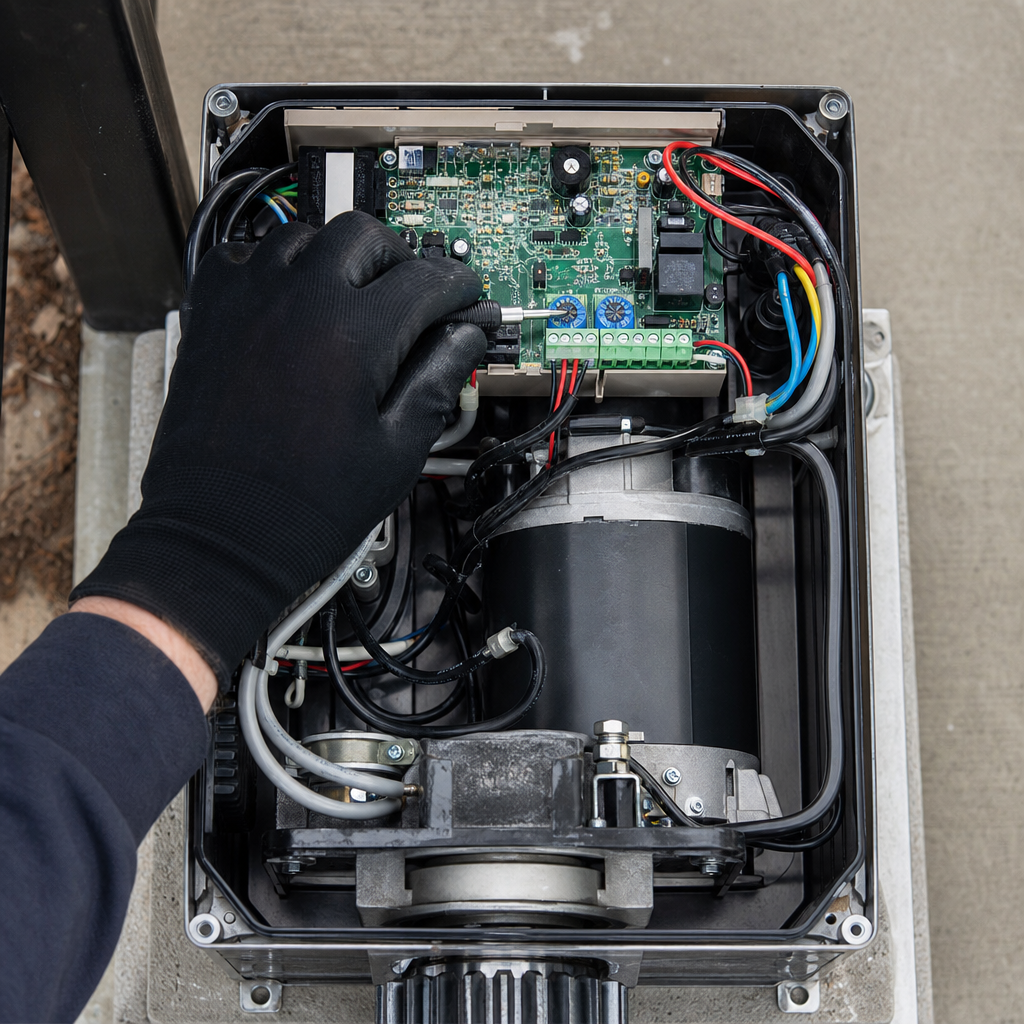
Obstruction, sensor, power, battery, manual-release, and control faults can prevent operation; the research brief does not establish a most common cause.
- Clean the lenses: Wipe down optical sensor lenses with a clean, dry cloth to remove dirt, cobwebs, or moisture buildup.
- Check alignment: Verify that transmitter and receiver sensors are properly aligned according to their indicator lights and manufacturer specifications.
- Verify wiring integrity: Inspect wiring runs for visible damage, loose connections, or corrosion.
Step 5: Reprogram Open and Close Travel Limits
If limit settings must be reprogrammed after a reset, follow the precise instructions in your model’s manual.
- Consult the manual to enter the limit setup or learn mode.
- Set the fully open and fully closed boundaries according to the manufacturer’s steps.
- Ensure the gate stops at the appropriate travel points without striking mechanical stops with excessive force.
Step 6: Re-engage the Drive and Perform Full Safety Tests
Once settings are confirmed, ensure the operator is properly re-engaged and test all safety functions.
- Confirm the manual release is properly engaged as specified in the manual.
- Stand clear of the gate path with a full, direct line of sight to the entrance before initiating a cycle.
- Test entrapment protection: Test safety devices strictly following the operator’s manual and applicable requirements. Certain UL 325 requirements call for reversal to begin within 2 seconds after an obstruction is detected.
Troubleshooting Checklist
When troubleshooting an operator that fails to function, perform only supported general checks:
- Restore power where appropriate.
- Confirm the gate path is clear of any physical obstructions.
- Verify safety devices are connected and functioning properly.
- Confirm the manual release is properly engaged.
- Follow the model-specific manual for all further diagnostic steps.
Frequently Asked Questions About Resetting Gate Openers
Where is the reset button located on my gate motor?
Reset button locations, switches, and procedures vary widely by model and manufacturer. Always consult your operator’s owner manual to locate the correct reset control.
How do I reset an electric gate after a power outage?
Check that the main circuit breaker or power supply feeding the gate is active. Follow the manufacturer’s manual for instructions on restoring power and clearing any low-power or outage faults.
Why is my gate opener humming but not moving?
According to Ironworks Gate Co., a humming motor that fails to move may indicate mechanical binding, a component failure, or an engaged manual release. Immediately disconnect power or stop operation, and consult the manual or a qualified technician.
Why won’t my gate close after a reset?
Obstruction, sensor, power, battery, manual-release, and control faults can prevent operation. Check that the gate path is clear and that safety sensors are properly aligned and wired according to the manual.
How do I reprogram remotes after a reset?
Remote pairing and learn procedures depend entirely on the specific radio receiver and operator model. Refer to your owner manual for the exact pairing sequence.
“`
Need how to reset automatic gate opener?
We’re available now - call for a fast, free estimate.
Sources
- New Safety Standard for Automatic Security Gates Helps Prevent … – cpsc.gov (2000)
- Search Home – SaferProducts – saferproducts.gov
- NSSC Public Document Search – NASA – searchpub.nssc.nasa.gov
- Gate Operators and UL 325 – DASMA – dasma.com (2000)
- UL 325 and Gate Installations – dasma.com (2016)
Related reading: Electric Gate Stuck Closed | 10% Off & Free Estimate | On-Site in 60 Minutes
Related reading: Reset Gate Motor | 10% Off & Free Estimate | Same-Day Service
Related reading: How to Open Sliding Gate Manually | 10% Off & Free Estimate | Same-Day Service
Frequently Asked Questions
What should I do if my gate opener triggers a hard lockout after detecting multiple obstructions?
Under UL 325 standards, two sequential obstruction events place the operator into a hard entrapment shutdown that requires an intended line-of-sight reset input. Clear the entire gate travel path of any obstacles or sensor misalignments before initiating the reset according to your manual. If the system remains unresponsive, contact Ironworks Gate Co. to inspect your entrapment-protection circuits and mechanical components.
Do I need to disconnect backup batteries when power cycling a gate operator?
Yes, if your gate opener includes an integrated battery backup, switching off the main breaker alone will not completely depower the control board. You must disconnect both the primary AC power supply and the battery harness per your owner manual to fully cycle the logic board. Once cleared, reconnect the battery and main power before testing movement.
Why does my automatic gate keep faulting immediately after a reset?
Repeated faulting usually indicates unresolved mechanical resistance, track binding, or failing safety sensor wiring rather than a simple software glitch. Continuing to force resets under these conditions can overheat the motor and damage drive gears. Ironworks Gate Co. recommends keeping the gate out of service and scheduling a professional on-site diagnostic to pinpoint deeper electrical or structural issues.
About the author
 |
Marcus Thorne Marcus Thorne is a security infrastructure specialist with over a decade of experience in automated gate systems and perimeter defense. Holding a degree in Mechanical Engineering from California State Polytechnic University, Pomona, he previously worked as a technical consultant for commercial property management firms across Southern California. Marcus focuses on providing clear, actionable advice on gate repair, maintenance costs, and security upgrades for residential and commercial properties. |
Gate not opening, off track, or opener dead?
We’re available now - call for a fast, free estimate.
Call Now - Free Estimate