
Quick Summary
When an automated driveway gate suddenly stops working, effective gate motor troubleshooting requires systematically isolating physical track and hinge binding before assuming internal electrical failure. Ironworks Gate Co. recommends first disengaging the manual release to test mechanical drag, followed by inspecting optical safety sensors, checking GFCI breakers, and evaluating capacitor health. Following this diagnostic guide enables property owners to safely resolve basic operator malfunctions and know exactly when complex internal motor or high-voltage repairs require professional intervention.
Gate Motor Troubleshooting: Fix Your Stuck Gate Fast
When an automated driveway gate stops moving, the natural reaction is to blame the motor or the control board. In practice, jumping straight into electrical repairs often wastes time and money. According to Ironworks Gate Co., gate operators are high-torque machines engineered to move free-hanging or smooth-rolling loads. If the gate hinges are binding, the track is bent, or the mounting post has shifted, even a brand-new motor will stall or burn out. Effective gate motor troubleshooting begins by isolating physical, structural drag from actual electrical failure.[2]
Before taking a screwdriver to your operator housing, work through this guide to systematically inspect your gate hardware, test power feeds, realign optical safety sensors, and evaluate internal drive components safely. See also Commercial Gate Repair – 10% Off & Free Estimate – On-Site in 60 Minutes.
Gate Motor Troubleshooting: Quick Diagnostic Summary
Quick Diagnostic Summary: To troubleshoot an automated gate that will not open or close, first check the main power breaker and any outdoor GFCI outlets. Next, inspect the optical safety sensors (photocells) for dirt, moisture, or misalignment. Use your manual release key to disconnect the drive motor and move the gate by hand; if the gate resists, scrapes, or binds, the problem is physical rather than electrical. If the motor hums loudly without moving the gate while decoupled, the issue is typically a failed run capacitor, seized gearbox, or motor winding failure that requires component repair.[3]
Fast Checks for Common Gate Operator Problems
- Disengage the motor clutch: Insert the manual release key and unlock the drive mechanism. Swing or slide the gate by hand. If it feels heavy, scrapes along the driveway, or binds halfway, your issue is mechanical resistance, hinge wear, or post deflection.
- Check safety eye alignment: If your gate opens fine but refuses to close, the optical safety sensors are usually the culprit. Inspect the small LEDs on each sensor head to confirm they have power and an unobstructed line of sight.
- Perform a logic reset: For an electric gate not working at all, switch off the dedicated breaker, disconnect any battery backups for 30 seconds, and restore power to clear transient software lockouts.
Never force a stuck gate. California workplace safety records from 1990 through 2024 documented 47 serious accidents involving horizontal sliding gates that derailed and fell, leading to 35 injuries and 12 fatalities. ASTM safety standards emphasize the necessity of positive physical stops and anti-fall protection to keep panels secured on their tracks during mechanical failure.[1]
What You Need for Safe Gate Motor Troubleshooting
Working around automatic gates involves high electrical voltages, stored capacitor energy, and severe mechanical pinch points. Gather the necessary gear before testing your system.
Essential Tools and Equipment
- Manual release key: Keep the factory release tool or hex key on hand to disengage the drive arm or clutch.
- Torpedo level and tape measure: Used to check whether support posts or pilasters are leaning out of plumb.
- Cleaning supplies: A microfiber cloth, soft brush, and electrical contact cleaner to clear photocell lenses and sensor housings.
- Multimeter: Rated for CAT III testing to check incoming AC voltage and DC battery health.
- Work gloves and eye protection: Essential gear to protect against pinch points and electrical sparks.
Safety First: Pre-Inspection Checklist
Automatic gate operators produce substantial torque. CPSC data cited in ASTM standards highlight thousands of entrapment and impact injuries over the years. Keep these precautions in mind:[4]
- Kill the primary power: Shut off the dedicated circuit breaker before opening any motor enclosures, junction boxes, or wiring compartments.
- Stay clear of pinch zones: Never place your hands near drive sprockets, roller chains, scissor arms, or open rack teeth while the system is powered.
- Never bypass safety circuits: Do not jumper or disable photo-eyes or safety edges permanently to bypass an open circuit; this creates an immediate hazard for vehicles and pedestrians.
Step 1: Check Structural Pilaster Deflection and Mechanical Binding
Need gate motor troubleshooting?
We’re available now - call for a fast, free estimate.
A gate motor is designed to push or pull a balanced load, not lift a sagging frame. Heavy wrought-iron gates mounted to older brick posts or stucco pilasters frequently experience structural movement. Ground settling, moisture shifts, and nearby traffic vibration cause support columns to lean. When a post tilts even a fraction of an inch, the hinge geometry binds, forcing the motor to pull against extreme resistance.
How to Manually Open Automatic Gate Hardware to Test Drag
To isolate mechanical resistance from electrical drive failure, test the gate leaf manually:
- Unlock the manual release: Turn the release key or disengage the clutch pin according to your manufacturer instructions (such as LiftMaster, DoorKing, or BFT).
- Move the gate through its full stroke: Push or pull the gate slowly from fully open to fully closed.
- Feel for friction points: Note any spots where the gate hesitates, squeals, drops, or drags against the ground or track. A properly installed swing gate should glide smoothly with light hand pressure; a sliding gate should roll across its track without hopping or sticking.
- Check physical stops: Ensure sliding gates hit solid positive stops at both travel limits to prevent track derailment.
Inspecting Posts, Hinges, and Track Alignment
Place a torpedo level against the hinge post or pilaster. If the post leans toward the driveway, the gate is physically dropping, putting intense downward torque on the top hinge pin. Check grease fittings on heavy-duty barrel hinges, look for cracked welds along the mounting plates, and inspect bottom V-groove rollers on sliding gates for flat spots or packed debris.
Step 2: Verify Power Supply, Sub-Breakers, and Solar Backup
If your gate operator shows zero signs of life (no LED lights on the board, no relay clicks, and no motor sound), start at the main electrical feed.
Checking Breakers, Disconnects, and GFCI Outlets
- Inspect the sub-panel breaker: Look for a tripped breaker serving the dedicated gate run. High-draw motors can pop an undersized breaker during cold starts.
- Test the external GFCI outlet: Many gate systems pull power from an outdoor GFCI receptacle. Marine layer moisture, morning condensation, and landscape sprinklers can trip these sensitive outlets. Press the reset button firmly.
- Inspect wiring conduits: Look inside the operator base for signs of rodent damage, frayed low-voltage wiring, or water intrusion corroding the primary terminal block.
Assessing DC Battery Backup Health
Modern 12V and 24V DC gate operators rely on sealed lead-acid or lithium battery systems to handle power outages. Over time, these batteries lose capacity. A failing battery might show 12.6 volts at rest, but the moment the motor engages and demands starting current, the voltage collapses below operating thresholds, causing the gate to freeze or reset mid-cycle. Test your batteries under an active load using a multimeter.
Step 3: Clean, Align, and Diagnose Photo-Eye Safety Sensors
Sensor Diagnostics: Safety photo-eyes are designed to prevent the gate from closing on people, pets, or vehicles. When sensors are blocked, dirty, or misaligned, the gate controller interprets the break as an obstruction, keeping the gate open or reversing its travel immediately.
How Can I Tell If My Gate Opener Sensors Are Misaligned or Broken?
Look directly at the indicator LEDs on both the sending and receiving sensor heads:
- Solid green or red lights: Usually indicate power and correct alignment (check your operator manual for brand-specific color codes).
- Blinking or unlit LEDs: Signal an optical beam interruption, power loss, or severe misalignment.
- Lens inspection: Spiderwebs, mud dauber nests, dust, and hard-water mineral crust from sprinklers easily scatter the infrared beam. Wipe both lenses clean with a damp microfiber cloth.
- Physical alignment: Loosen the mounting bracket screws slightly, adjust the angle until the receiver indicator stays solid, and tighten the hardware down firmly.
Testing Sensor Wiring
As specialists at Ironworks Gate Co. observe, vibration from passing vehicles and daily gate cycles can loosen low-voltage wire connections inside the sensor head. Confirm all terminal screws are snug and inspect the wire run along the driveway cut or stucco wall for broken conductors or exposure to moisture.
Step 4: Troubleshoot Motor Humming, Capacitors, and Limit Switches
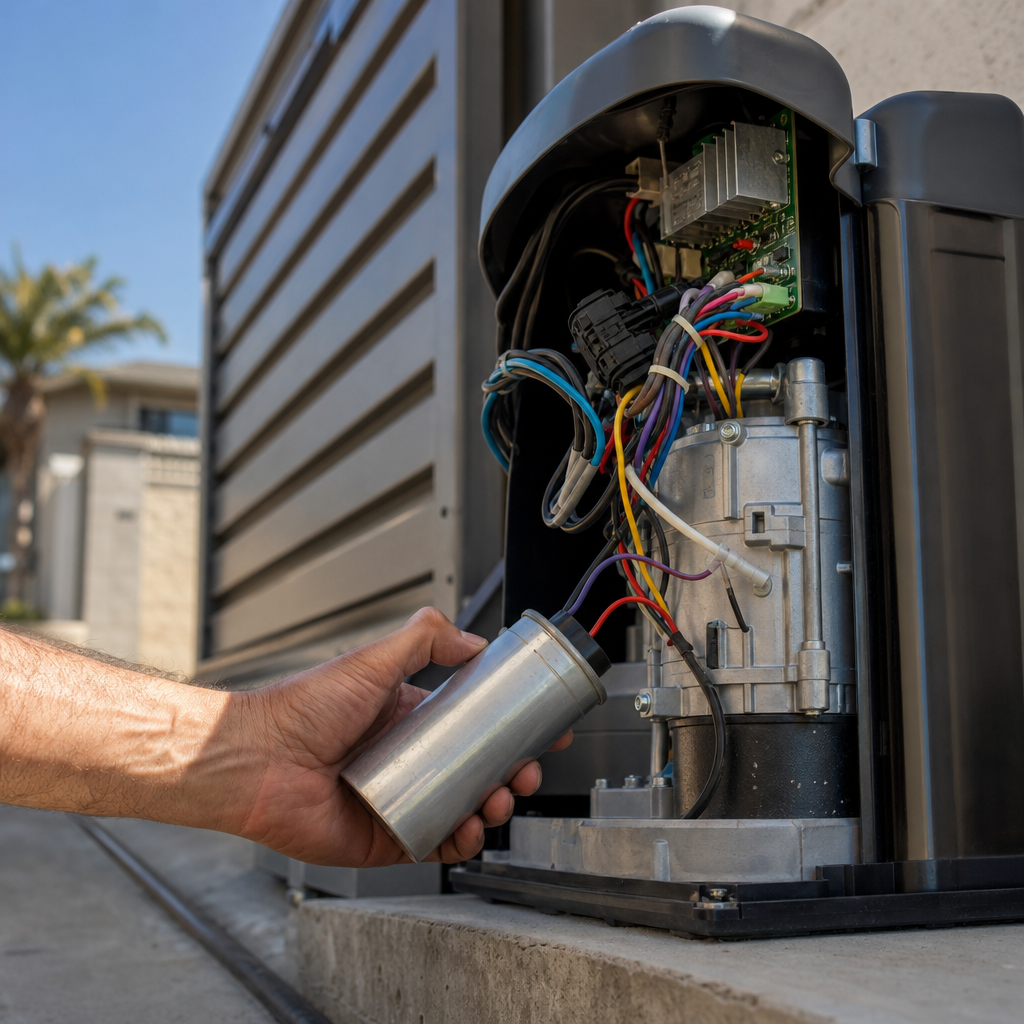
Motor Humming Diagnostics: A gate motor that hums or buzzes without turning indicates that electrical current is reaching the motor windings, but the rotor cannot spin. Stop pressing the remote immediately to avoid overheating the motor.
Why Is My Gate Motor Humming but Not Opening?
When an operator hums without moving the gate, the most common causes include:
- Failed AC start/run capacitor: On 115V or 230V AC motors, the run capacitor provides the electrical phase shift necessary to give the motor starting torque. When the capacitor degrades or leaks, the motor hums in place. Capacitors store dangerous electrical charges and require professional testing and discharge.
- Mechanical seizure: The internal gearbox, output shaft, or worm drive may have seized due to lack of lubrication or water penetration.
- Physical gate binding: The gate is physically locked against a strike plate, resting on the driveway, or jammed in the track.
Adjusting Magnetic and Mechanical Limit Switches
Limit switches tell the control board when the gate has reached its fully open or fully closed position. If the gate stops short or attempts to push past its physical stops:
- Magnetic limits: Ensure the track-mounted magnets on sliding gates have not shifted position and maintain a clean 1/4-inch to 1/2-inch clearance from the internal sensor pickup.
- Mechanical limit cams: For swing arm operators, inspect the internal rotating cams inside the chassis. Ensure they strike the microswitches cleanly without slipping.
Step 5: Test Control Boards, Intercoms, and Access Remotes
Need gate motor troubleshooting?
We’re available now - call for a fast, free estimate.
When the mechanical hardware, power feed, and safety eyes check out, the issue lies in the access controls or the main logic board.
How Do I Reset My Electric Gate Motor?
To clear logic faults on LiftMaster, DoorKing, Linear, or other common control boards:
- Turn off the dedicated electrical breaker switch.
- Disconnect the red and black battery backup leads.
- Wait 30 to 45 seconds to let onboard capacitors fully discharge.
- Reconnect the batteries and switch the main AC breaker back on.
- Cycle the gate once using the onboard open/close button to recalibrate travel limits.
What Causes an Electric Gate to Open on Its Own?
Uncommanded cycling or phantom openings typically point to a shorted input peripheral rather than a possessed gate:
- Stuck exit loop detector: Ground loop wires buried in the driveway can short out when exposed to ground moisture, sending a continuous “vehicle present” open signal.
- Corroded keypad or push-button: Moisture or insects inside an outdoor keypad housing can bridge contact terminals, triggering open commands.
- Radio frequency interference: A neighbor’s remote on a shared frequency or a remote control stuck under a car seat can cause unexpected gate activation.
Evaluating Brand-Specific Diagnostic Codes
Modern residential and commercial gate operators include onboard LED displays that flash specific diagnostic codes when a fault occurs:
- LiftMaster / Chamberlain: Look for the yellow diagnostic LED next to the reset button. The number of flashes indicates specific errors, such as safety-eye lockouts, force limit exceedances, or battery faults.
- DoorKing (DKS): Check the status LEDs on the 1830 or 9150 series circuit boards to verify which input terminals (safety, reverse, open, or loop) are actively triggered.
- BFT / Nice: These systems feature digital LCD screens that output direct error codes (such as “PHOT” for photocell errors or “AMP” for motor over-current sensing).
Repair vs. Replace: Making the Right Decision
Not every broken gate motor warrants a brand-new installation. However, pouring money into an aging operator mounted on structurally compromised hardware is a common pitfall.
| Issue Type | Recommended Action | Key Indicator |
|---|---|---|
| Sensor or Accessory Fault | Targeted Component Repair | Gate operates manually; board LEDs show an open safety circuit or low battery. |
| Failed Start Capacitor | Component Replacement | AC motor hums, operator moves freely when disconnected, board logic functions normally. |
| Internal Gearbox Failure | Chassis Replacement | Motor spins but output shaft does not turn, metal shavings found in gearbox oil. |
| Structural Deflection | Post and Hinge Realignment | Gate drags along driveway, manual release reveals heavy binding, pilaster is out of plumb. |
Frequently Asked Questions
Why does my automatic gate open partially and then stop?
This issue is usually caused by excessive mechanical resistance tripping the motor’s internal force sensitivity settings. When the gate hits a rough spot in the track or experiences hinge friction, the controller interprets the sudden amperage spike as an obstruction and halts travel. It can also stem from weak backup batteries unable to deliver sustained operational voltage, or misaligned travel limit switches.
How do I know if my control board is blown?
Inspect the circuit board visually for burn marks, swollen capacitors, or heat discoloration around the relays. Check the glass fuses on the board using a multimeter for continuity. If the board has verified incoming AC power and good fuses, but produces no indicator lights, clicks, or responses to onboard push-buttons, the logic board likely experienced a power surge or lightning damage and needs replacement.
Can I convert an old manual wrought-iron gate to an automated system?
Yes, provided the structural posts and hinges are thoroughly reinforced. Ironworks Gate Co. notes that heavy manual gates hung on pre-1960s brick or stucco pilasters often require structural steel posts set in deep concrete footings to handle the continuous torque and weight transfer of an automated operator without binding.
When should I call a professional gate technician?
Call a licensed professional if you encounter high-voltage electrical faults, internal motor winding shorts, broken torsion springs, hydraulic fluid leaks, or structural posts that have shifted out of plumb. Complex access control wiring and heavy structural realignment require specialized diagnostic meters and structural tools to service safely.
Need gate motor troubleshooting?
We’re available now - call for a fast, free estimate.
Sources
- Petition File No. 605 Proposed Decision – dir.ca.gov (2024)
- Petition File No. 605 Cal/OSHA Evaluation – dir.ca.gov (2024)
- New Safety Standard for Automatic Security Gates Helps … – cpsc.gov (2001)
- Standards for the Hidden Dangers of Gates – ASTM – astm.org (2025)
Related reading: Diy Gate Repair – 10% Off & Free Estimate – On-Site in 60 Minutes
Related reading: Automatic Gate Not Opening | Call Now-10% Off | Same-Day Service | Free Estimate
Related reading: Electric Gate Not Working After Power Outage | Call Now-10% Off | Same-Day Service | Free Estimate
Frequently Asked Questions
How can I tell if my gate motor humming is caused by a bad capacitor versus a seized gearbox?
Disengage the manual release clutch and run the operator; if the motor still hums without spinning while completely free of the gate load, the issue is a failed capacitor or damaged motor winding. If the motor spins freely when disconnected but cannot move the gate when engaged, the internal gears are stripped or seized. Because capacitors store dangerous electrical voltage, Ironworks Gate Co. recommends professional bench testing rather than attempting DIY capacitor discharge.
Why does my automatic gate trip the breaker only during cold mornings or after rain?
Cold weather thickens gearbox lubricants and stiffens hinge grease, forcing the motor to draw higher starting amperage that can trip an undersized or aging circuit breaker. In wet conditions, morning condensation or sprinkler spray often infiltrates unsealed outdoor GFCI receptacles or sensor housings, causing ground fault trips. Ironworks Gate Co. can evaluate your electrical draw and weather-seal vulnerable conduits to prevent nuisance outages.
What should I do if the gate control board continues flashing error codes after a hard reset?
Persistent diagnostic flashes after cycling AC power and disconnecting backup batteries indicate an active peripheral fault, such as a shorted driveway safety loop or damaged photo-eye wiring. Cross-reference the specific LED flash count with your operator manual (such as LiftMaster or DoorKing diagnostic charts) to identify the locked circuit. If the fault points to an internal board short, contact Ironworks Gate Co. for same-day diagnostic testing or circuit board replacement.
About the author
 |
Marcus Thorne Marcus Thorne is a security infrastructure specialist with over a decade of experience in automated gate systems and perimeter defense. Holding a degree in Mechanical Engineering from California State Polytechnic University, Pomona, he previously worked as a technical consultant for commercial property management firms across Southern California. Marcus focuses on providing clear, actionable advice on gate repair, maintenance costs, and security upgrades for residential and commercial properties. |
Gate not opening, off track, or opener dead?
We’re available now - call for a fast, free estimate.
Call Now - Free Estimate