
Quick Summary
When an electric gate opener is not working due to power disruptions, obstructed photo-eyes, or physical track resistance, quick diagnostic checks are essential to restore secure property access safely. Property owners can safely resolve basic issues by checking circuit breakers, replacing remote batteries, and cleaning sensor lenses, but internal circuit faults and motor failures require the specialized diagnostic expertise of Ironworks Gate Co. After reading this guide, you will be able to safely troubleshoot common operator issues and determine when to schedule a professional on-site assessment for same-day mechanical and electrical repairs.
Electric Gate Opener Not Working: Fast Fixes & Repairs
When an electric gate opener is not working, the disruption is immediate. You may find yourself unable to open or close your gate, with an operator that does not respond. Power interruptions, activated or malfunctioning safety devices, and physical obstructions can cause an automatic gate to stop operating. Basic troubleshooting begins with checking the main power supply, observing and cleaning safety sensors, testing remote batteries, and checking for visible obstructions along the gate path.[2]
Safety is the primary consideration when inspecting automated gate systems. Data from the U.S. Consumer Product Safety Commission (CPSC) indicates approximately 1,500 emergency-room injuries linked to automatic gates between 2011 and 2015 (averaging around 300 per year); this statistic concerns emergency-room injuries during that timeframe, not the failure rate of electric gate openers. Never place hands or body parts near moving parts, drive mechanisms, or pinch points while the unit is energized.[1] See also Automatic Gate Troubleshooting – 10% Off & Free Estimate – Same-Day Service.
Homeowner checks should be limited to visible obstruction checks, basic power checks, remote-battery checks, and sensor cleaning and observation. Electrical, structural, or entrapment-related issues should be referred to a qualified professional technician.
What to Do First When Your Gate Stops Working
Before attempting any checks, review the basic conditions required for operation. An automatic gate may stop operating due to power interruptions, activated or malfunctioning safety devices, or physical obstructions.
Immediate Diagnostic Checklist
- Verify the main power: Check your breaker panel to confirm the circuit breaker supplying the gate system has not tripped. Check any associated ground-fault circuit interrupter (GFCI) outlets.
- Inspect the optical photo-eyes: Look at the safety sensor lenses. Check for visible dirt, cobwebs, debris, or misalignment.
- Check the physical path: Inspect the track, ground area, or swing path for stones, debris, or other physical obstructions that may prevent movement.
Basic Supplies for Homeowner Inspection
For basic checks, homeowners may use a clean microfiber cloth to gently clean sensor lenses, fresh batteries for remotes and keypads, and the manufacturer user manual. Technical repairs involving internal wiring, circuit boards, or structural realignments should be left to professional service personnel, such as the specialists at Ironworks Gate Co.
Step 1: Inspect Power Feeds, Breakers, and Operator Resets
An inoperative gate operator may be affected by an interrupted power supply.
Operator Reset Procedures
Reset-button locations and procedures vary by model. Consult the operator’s installation or user manual because reset-button and manual-release locations vary by model.
Checking Breakers and GFCI Outlets
- Check the main electrical panel to see if the dedicated circuit breaker has tripped.
- Inspect any external disconnect switches or GFCI outlets connected to the gate system to verify power delivery.
- If a circuit breaker or GFCI repeatedly trips, stop use and contact a qualified professional to diagnose potential electrical faults.
Step 2: Clean and Inspect Photo-Eye Safety Sensors
Automated gates use safety sensors to detect obstructions. If a safety device is activated, misaligned, or malfunctioning, the gate may not operate normally.
Inspecting Sensor Alignment and Wiring
- Check indicators: Sensors should be clean, aligned, securely wired, and showing their normal indicators according to the operator manual. Diagnostic indicator lights and behaviors vary depending on the model.
- Inspect visible wiring: Check visible low-voltage wiring for obvious physical damage or loose connections. Never bypass safety sensors, and use only compatible approved sensors.
- Testing sensor function: When testing sensor operation, use a safe object or the body only when the specific manual permits it, and ensure you do not place yourself in a hazardous path.
Cleaning Lenses and Checking Mounts
Clean external sensor lenses gently with a soft cloth to remove dust, moisture, or residue that could block the sensor beam. Ensure mounting brackets remain securely fastened and aligned according to the manufacturer manual.
Step 3: Test Keypads, Transmitters, and Remotes
If the operator is powered and safety devices are clear, verify that control signals are being transmitted properly.
Checking Remote Controls
- Replace transmitter batteries: Replace depleted batteries in handheld remotes and wireless keypads to ensure a proper signal is transmitted.
- Inspect antenna: Check that the external receiver antenna is visible, intact, and not damaged.
Checking Alternate Controls
If an alternative hardwired control or wall switch is available and functions, the issue may involve remote batteries, transmitter programming, or signal reception.
Step 4: Check for Gate Binding and Physical Resistance
Need electric gate opener not working?
We’re available now - call for a fast, free estimate.
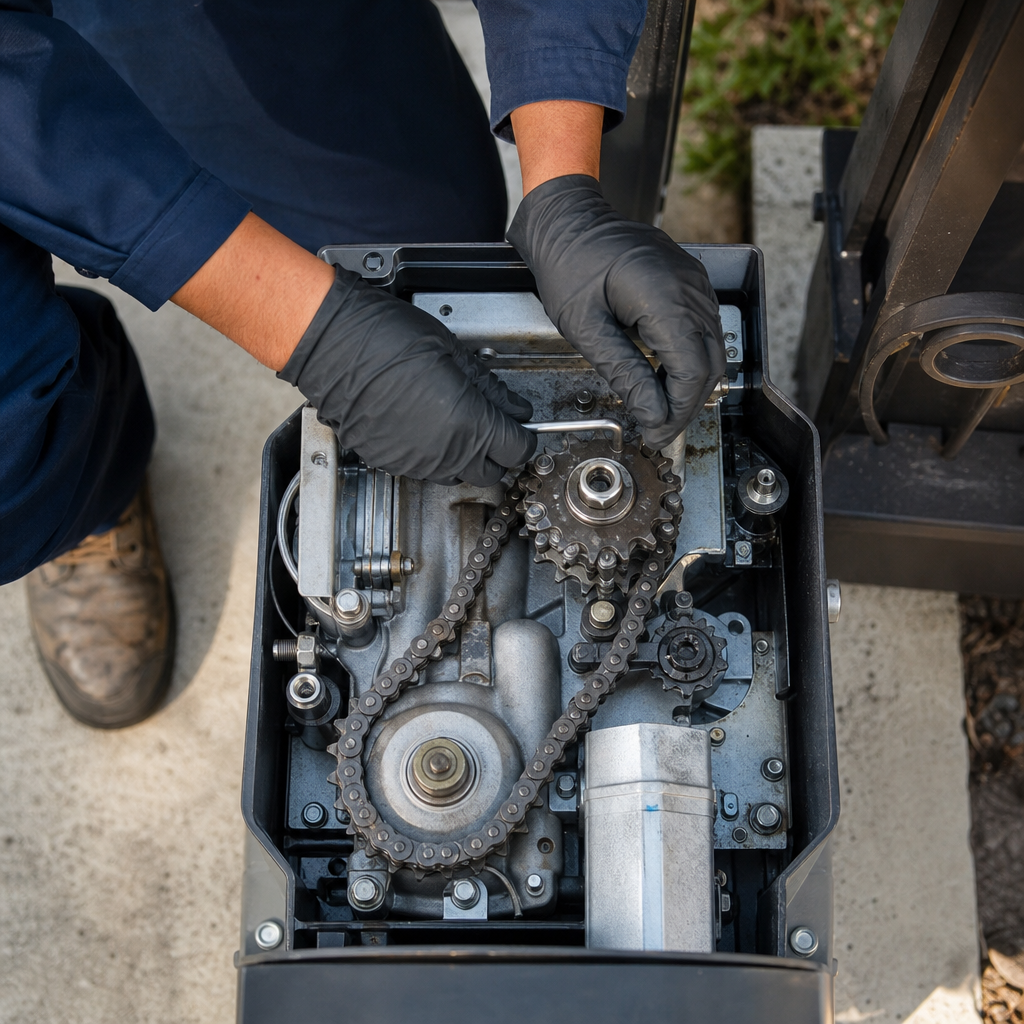
Physical resistance along the track, hinges, or posts can prevent a gate from operating smoothly.
Evaluating Physical Movement
- Consult the operator’s installation or user manual for instructions on how to safely disengage the gate operator, as manual-release locations vary by model.
- Once disengaged, carefully check gate movement by hand if safe to do so. Stop use if the gate binds, moves abnormally, or encounters resistance.
- If you observe severe binding, sagging posts, or physical damage, discontinue operation and contact a professional technician, such as Ironworks Gate Co., for structural or mechanical repair.
Step 5: Motor and Mechanical Drive Observations
If the operator makes unusual sounds, hums, or clicks without moving the gate, it may be encountering mechanical resistance, an unreached limit, a power issue, or internal component failure. Because potential causes vary widely depending on the system design and condition, complex mechanical or electrical diagnostics should be handled by a professional technician.
Step 6: Safely Disengaging the Gate for Manual Operation
When power is interrupted or the operator is not functional, manual operation may be necessary to move the gate.
Manual Release Guidance
Consult the operator’s installation or user manual because reset-button and manual-release locations vary by model. Do not force mechanical release levers, keys, or clutches. Once the operator is disengaged, stop use if the gate binds, moves abnormally, or encounters resistance, and do not place yourself in a hazardous path.
Professional Service and Maintenance Considerations
While basic maintenance such as replacing remote batteries, cleaning sensor lenses, and removing visible debris can be performed by homeowners, complex issues require professional evaluation. Electrical repairs, entrapment protection adjustments, motor servicing, and structural realignment should be performed by qualified gate service professionals, such as Ironworks Gate Co., according to manufacturer specifications.
Frequently Asked Questions
Why is my electric gate opener not responding to the remote or keypad?
Potential causes include depleted remote batteries, power interruptions to the operator, an activated or blocked safety sensor, or signal reception issues.
Where is the reset button located on an electric gate opener?
Consult the operator’s installation or user manual because reset-button and manual-release locations vary by model.
Why is my gate opener motor humming or clicking but not moving?
This may indicate power supply issues, mechanical binding, or an internal mechanical or electrical fault. If the gate fails to move, discontinue use and consult a professional technician.
How do I test if gate safety sensors or photo-eyes are working?
Verify that sensors are clean, properly aligned, securely wired, and showing their normal indicators according to the operator manual. If testing the beam, use a safe object or the body only when the specific manual permits it, and never place yourself in a hazardous path. Never bypass safety sensors, and use only compatible approved sensors.
How do I manually open an electric driveway gate during a power outage?
Consult the operator’s installation or user manual because manual-release mechanisms and procedures vary by model. Stop use if the gate binds, moves abnormally, or encounters resistance.
When should I attempt basic checks versus calling a professional contractor?
Homeowner guidance is limited to visible obstruction checks, basic power checks, remote-battery checks, and sensor cleaning and observation. Contact a professional technician for any electrical, structural, mechanical, or entrapment-related issues.
Need electric gate opener not working?
We’re available now - call for a fast, free estimate.
Sources
- Injury patterns and epidemiology of automatic door-related … – pubmed.ncbi.nlm.nih.gov (2024)
- CHAPTER SIX Automatic Electric Gates – nwfdaz.gov
Related reading: Electric Gate Maintenance | Call Now-10% Off | Same-Day Service | Free Estimate
Related reading: Automatic Gate Opener Troubleshooting – Call Now-10% Off – Same-Day Service – Free Estimate
Related reading: Manually Open Electric Gate – Call Now-10% Off – Same-Day Service – Free Estimate
Frequently Asked Questions
Why does my electric gate keep tripping the breaker or GFCI outlet repeatedly?
A gate opener that repeatedly trips the breaker typically suffers from an internal short circuit, moisture intrusion in the control box, or a motor drawing excessive amperage under mechanical strain. Avoid repeatedly resetting the breaker to prevent electrical fire hazards, and contact Ironworks Gate Co. for a professional same-day electrical diagnosis.
How can I tell if my gate operator failure is caused by physical binding or a burnt-out motor?
Disengage the operator using the manual release mechanism and carefully move the gate along its track by hand to test for resistance or post sagging. If the gate moves smoothly by hand but the operator only hums or clicks when powered, the internal motor or capacitor has likely failed and requires mechanical servicing from Ironworks Gate Co.
What should I do if my electric gate is stuck partially open and will not close?
Check that the optical safety sensors are clean, properly aligned, and not blocked by debris or direct sunlight reflection. If the safety eyes are clear and the gate remains immobilized, switch off main power and contact Ironworks Gate Co. for an on-site assessment to repair faulty limit switches or circuit boards.
About the author
 |
Marcus Thorne Marcus Thorne is a security infrastructure specialist with over a decade of experience in automated gate systems and perimeter defense. Holding a degree in Mechanical Engineering from California State Polytechnic University, Pomona, he previously worked as a technical consultant for commercial property management firms across Southern California. Marcus focuses on providing clear, actionable advice on gate repair, maintenance costs, and security upgrades for residential and commercial properties. |
Gate not opening, off track, or opener dead?
We’re available now - call for a fast, free estimate.
Call Now - Free Estimate