
Quick Summary
When an automated driveway gate fails to operate, practical electric gate opener troubleshooting starts by systematically isolating mechanical binding from electrical faults. Experts at Ironworks Gate Co. explain that while issues like misaligned photo-eyes, dead remote batteries, or tripped breakers can be resolved with basic maintenance, humming motors and degraded capacitors require specialized testing. Readers will learn how to safely inspect hardware, interpret brand-specific diagnostic codes, and determine when to call for professional on-site diagnostics.
Electric Gate Opener Troubleshooting: How to Find and Fix Common Problems
When an automatic driveway gate refuses to open or close, the immediate assumption is usually a fried circuit board or a burnt-out motor. In reality, many gate failures come down to simple issues: misaligned safety sensors, power disconnects, or physical resistance along the hinges and track. Because automated gates combine high-voltage electronics with heavy, moving steel or iron, troubleshooting, as noted by Ironworks Gate Co., requires a methodical approach that separates mechanical resistance from electrical failure.[1]
Automatic gates present serious mechanical hazards and pinch-point risks, making general safety awareness and cautious inspection protocols critical. This guide outlines general diagnostic steps to help identify common gate issues, recognize what can typically be resolved with basic maintenance, and determine when a problem requires an experienced technician.[2]
Fast Diagnostics: What to Check First
Before pulling out tools or removing operator covers, review these general checks to help isolate potential symptoms (always consult your specific manufacturer manual for model-specific diagnostic steps):
- Look at the safety photo-eyes: Check the optical sensors near the bottom of each post. If the indicator lights are flashing, unlit, or misaligned, the opener may prevent the gate from closing to protect against entrapment.
- Check the breaker and subpanel: Verify that the dedicated circuit breaker or GFCI outlet powering the gate operator has not tripped.
- Listen to the operator: If the unit makes a faint clicking sound when triggered, the control board may be receiving your signal while power is not reaching the motor or the motor is stalled. If it hums without moving, it commonly indicates a mechanical jam, seized gearbox, or failed capacitor.
- Test manual movement: Disengage the manual release clutch and swing or slide the gate by hand. If the gate resists, sticks, or drags on the ground, the issue is likely structural or mechanical rather than electrical.
What You Need Before You Start
Keep a few basic tools on hand so you can safely inspect the hardware:
- Your manual release key or mechanical disconnect tool
- A digital multimeter for testing low-voltage terminals and line power
- A clean microfiber cloth and isopropyl alcohol for optical lenses
- A standard four-foot level to check post deflection and track grade
- Insulated hand tools (screwdrivers, socket set)
Safety rule: Always switch off high-voltage power at the breaker panel before removing the main operator cover or touching terminal blocks.
Step 1: Inspect Hinges, Posts, and Tracks for Mechanical Binding
A frequent cause of gate opener trouble is physical binding. Many automated operators are equipped with current-sensing safety features. If the motor encounters resistance along the swing arc or track, it may interpret the resistance as an obstruction and halt or reverse to avoid overloading the system.[4]
Over time, heavy wrought-iron or steel gates put significant torque on masonry pilasters and steel posts. Ground settling, nearby heavy traffic vibration, and soil moisture shifts can cause posts to lean. That slight deflection can bind barrel hinges, pinch guide rollers, or force slide gates off level, leading to stall conditions.
General Method to Test for Mechanical Drag
- Insert your manual release key into the operator or pull the release lever to disengage the drive arm or chain, following your model’s manual.
- Move the gate leaf through its travel path by hand.
- Pay close attention to resistance points. The gate should generally glide with consistent effort. If significant force is required at any point in the swing or slide, the hinges or track may need lubrication, realignment, or structural adjustment.
Step 2: Check the Power Supply and Reset the System
Need electric gate opener troubleshooting?
We’re available now - call for a fast, free estimate.
If the operator is completely silent and unresponsive to inputs, checking the electrical supply is a standard initial step as outlined in most operator manuals.
- Reset the breaker: Locate the dedicated subpanel or main breaker for the gate. Flip the breaker completely off and back on. If the system uses an outdoor GFCI outlet, press the reset button on the receptacle.
- Check the operator reset button: Depending on the brand and model (such as units from LiftMaster, DoorKing, or Mighty Mule), an external or internal reset switch may be present. Refer to the specific manufacturer manual for the exact switch location and recommended power-cycle procedure.
- Inspect wiring runs: Outdoor conduit and low-voltage wiring exposed to outdoor moisture can deteriorate over time. Visually check for damaged conduit, worn wire insulation, or loose terminal connections on the control board.
Step 3: Clean and Realign Photo-Eye Safety Sensors
If your gate opens without issue but refuses to close, the safety photo-eyes are frequently a primary factor. Automatic gates commonly employ monitored safety devices that project an infrared beam across the driveway. When that beam is obstructed or misaligned, the operator typically prevents the gate from closing.[3]
- Inspect the diagnostic LEDs: Check the indicator lights on both the transmitter and receiver units. According to many manufacturer manuals, a solid light often indicates proper alignment, while a flashing or unlit LED typically signals an obstruction or misalignment.
- Clean the lenses: Wipe away spider webs, dirt, hard water deposits, and grime using a damp microfiber cloth.
- Correct alignment: Adjust the mounting bracket angle until the status LED indicates proper alignment per manufacturer instructions. If direct sunlight blinds the receiving lens, a small sensor hood may help shield it.
Step 4: Troubleshoot a Humming Motor and Component Failures
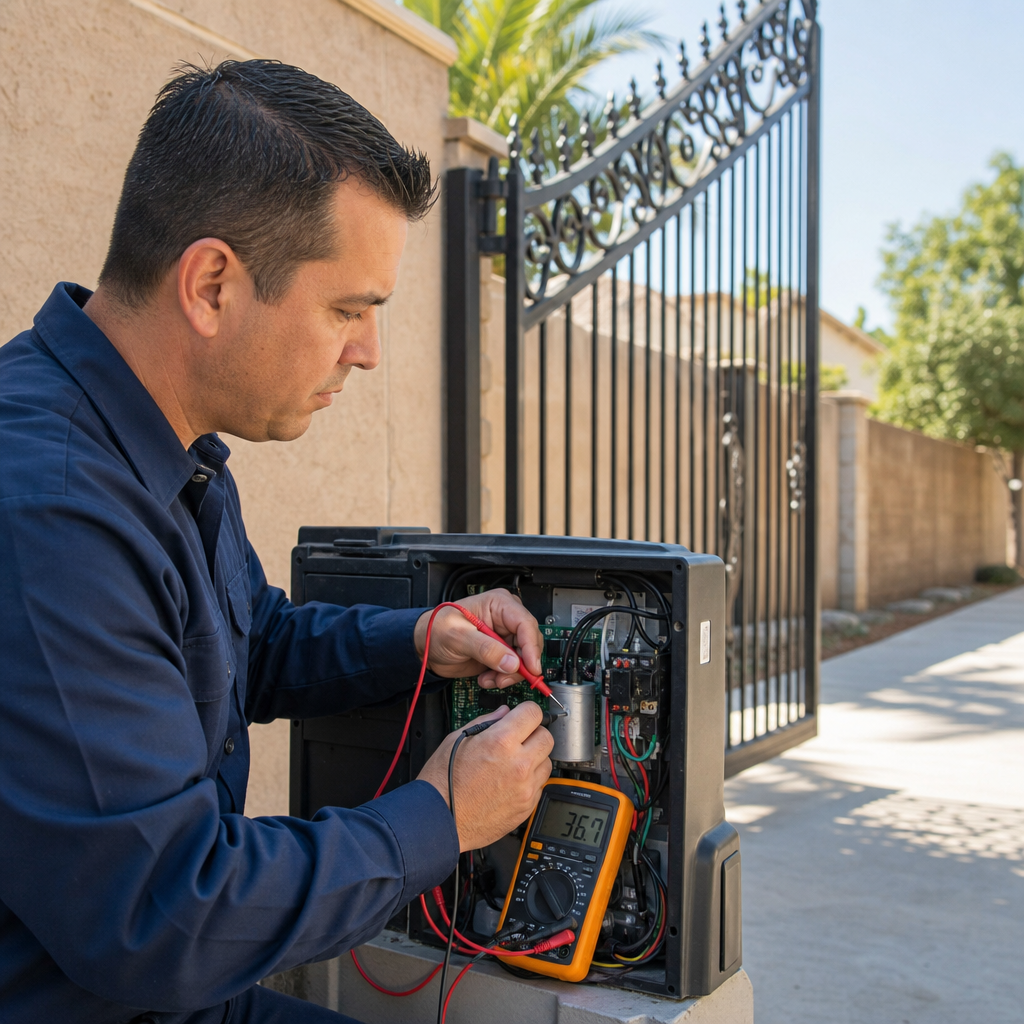
When an electric gate motor makes a loud humming sound but fails to turn, it commonly indicates a mechanical jam, seized gearbox, or failed capacitor.
As explained by Ironworks Gate Co., single-phase AC gate operators often rely on a start/run capacitor to provide the phase shift and torque necessary to turn the motor under load. Over time and extensive duty cycles, capacitors can degrade. When the motor attempts to start, it may receive voltage but lack the torque to begin rotation, resulting in an audible hum.
- Disconnect line power completely before inspecting the unit.
- Visually check the capacitor inside the cabinet for signs of bulging, oil leakage, or scorch marks if accessible.
- Do not touch capacitor terminals directly. Capacitors can retain dangerous electrical charges even when disconnected from mains power. Discharging, testing, and replacing capacitors should be handled by a qualified technician using appropriate safety equipment.
Step 5: Test Remote Controls, Keypads, and Receivers
To evaluate whether an issue involves the radio controls or the underlying operator, typical diagnostic checks include:
- Use a hardwired control: Trigger the gate using an interior push button, key switch, or wired keypad. If the gate operates normally via wired controls, the basic motor and control circuitry are generally operational.
- Swap transmitter batteries: Replace batteries in handheld remotes and check that battery terminals are clean and making solid contact.
- Inspect the receiver antenna: Ensure the antenna wire is properly positioned, undamaged, and not shielded by heavy metal enclosures.
- Check for radio frequency (RF) interference: Nearby wireless devices or faulty external electronic ballasts can occasionally cause RF interference that reduces remote range.
Step 6: How to Manually Open Your Gate During an Outage
Need electric gate opener troubleshooting?
We’re available now - call for a fast, free estimate.
When power fails and access is necessary, gate operators generally include a mechanical bypass procedure described in the user manual:
- Locate the manual release: Depending on the model, swing arm actuators often use a keyed release or release pin, whereas slide gate operators typically feature a keyed access door or disconnect lever on the chassis.
- Disengage the drive: Follow the manufacturer manual instructions to disengage the drive mechanism from the gate leaf or chain.
- Push the gate open slowly: Move the gate leaf by hand and secure it properly so wind does not cause unintended movement.
- Re-engage before restoring power: Consult your operator manual on re-engaging the clutch or release mechanism before resuming powered operation.
Brand-Specific Diagnostic Highlights
Manufacturer documentation outlines specific diagnostic indicators and board configurations to assist in troubleshooting:
- LiftMaster / Chamberlain: According to manufacturer manuals, many models feature diagnostic LEDs on the logic board that flash designated code sequences (for example, specific flash counts indicating limit switch adjustments or safety device faults) to pinpoint error states.
- DoorKing (DKS): Manufacturer documentation notes that status LEDs on DKS control boards light up to indicate active terminal inputs, helping identify if an external device, such as an edge sensor or loop detector, is actively holding the gate open.
- Viking Access / Nice / BFT: Many models from these manufacturers incorporate digital displays or multi-LED boards that provide diagnostic readouts and status codes as detailed in their respective technical manuals.
- Mighty Mule: According to manufacturer product guides, Mighty Mule operators operating on battery power commonly use audible beep sequences from the control box to signal specific conditions, such as low battery voltage or obstructed travel.
When to Call a Professional Gate Technician
Basic maintenance, such as cleaning lenses, replacing remote batteries, clearing debris from slide tracks, and lubricating external hardware according to manufacturer instructions, is generally manageable for property owners. However, structural realignment of heavy posts, welding damaged brackets, diagnosing internal board logic, and servicing high-voltage electrical components or capacitors require specialized tools and training. When basic checks do not resolve the problem, contacting a qualified automated gate technician, such as the specialists at Ironworks Gate Co., is recommended.
Frequently Asked Questions
Why does my electric gate open fine but refuse to close?
A gate that opens but will not close often indicates an interrupted or triggered safety circuit. Check photo-eye sensors for dirty lenses, physical misalignment, broken wiring, or physical obstructions blocking the optical beam.
Where is the reset button on an automatic gate opener?
Reset button locations vary by brand and model. According to manufacturer manuals, they are typically found on the exterior of the operator housing, near the power entry, or directly on the primary circuit board inside the cabinet.
Why is my gate motor humming but not moving the gate?
A humming motor commonly indicates a mechanical jam, seized gearbox, or failed capacitor that prevents normal rotation under load.
Can a standard handyman repair an automated gate?
While general maintenance such as cleaning tracks can be handled broadly, automated gate systems involve high-voltage power, sensitive control circuitry, and mechanical entrapment protection standards. Servicing internal electronic boards and safety loop systems often requires specialized technician expertise.
Need electric gate opener troubleshooting?
We’re available now - call for a fast, free estimate.
Sources
- [PDF] 2024-11-20-COPF-CODD-Hummingbird-Alliance-Meeting-Log.pdf – cpsc.gov (2024)
- New Safety Standard for Automatic Security Gates Helps … – cpsc.gov (2000)
- Research and Reports – cpsc.gov
- The Serious Dangers of Automatic Gates – hg.org
Related reading: Automatic Gate Opener Troubleshooting – Call Now-10% Off – Same-Day Service – Free Estimate
Related reading: Manually Open Electric Gate – Call Now-10% Off – Same-Day Service – Free Estimate
Related reading: Automatic Gate Maintenance Checklist – Call Now-10% Off – Same-Day Service – Free Estimate
Frequently Asked Questions
What causes an electric gate opener to repeatedly trip the circuit breaker?
Repeated breaker trips usually point to a short circuit in underground wiring, water intrusion inside the control housing, or a motor drawing excessive amperage against severe mechanical binding. If cycling the breaker immediately trips the circuit again, keep the power off and schedule professional diagnostics with Ironworks Gate Co. to prevent board damage.
Why does my electric gate stop halfway through its cycle and reverse?
Automatic openers reverse mid-cycle when built-in current sensors detect physical drag caused by unlubricated hinges, track settlement, or guide roller binding. Intermittent photo-eye signal loss from physical vibration or misaligned mounting brackets can also trick the control board into sensing an obstruction.
How can I tell if my gate opener problem is a failed start capacitor?
A failing capacitor typically causes the operator motor to hum loudly without turning the drive mechanism, or the gate may only move if pushed manually to start rotation. Because capacitors retain hazardous electrical charges even after power is disconnected, testing and replacement should be handled by a qualified technician.
About the author
 |
Marcus Thorne Marcus Thorne is a security infrastructure specialist with over a decade of experience in automated gate systems and perimeter defense. Holding a degree in Mechanical Engineering from California State Polytechnic University, Pomona, he previously worked as a technical consultant for commercial property management firms across Southern California. Marcus focuses on providing clear, actionable advice on gate repair, maintenance costs, and security upgrades for residential and commercial properties. |
Gate not opening, off track, or opener dead?
We’re available now - call for a fast, free estimate.
Call Now - Free Estimate